Unlocking Summer Creativity: A Complete Guide to Girly Digital Paper Collections
As the seasons change and the warmth of summer approaches, there is a distinct shift in the creative atmosphere. For designers, crafters, educators, and small business owners, this seasonal transition offers a perfect opportunity to refresh projects with vibrant, cheerful aesthetics. One of the most versatile tools for achieving this look is Girly Summer Digital Paper. While the term might sound niche, these digital assets have become a cornerstone of modern graphic design, scrapbooking, and educational material creation. This article explores what these digital papers are, why they matter, and how you can leverage high-resolution collections to elevate your work.
What Exactly Is Girly Summer Digital Paper?
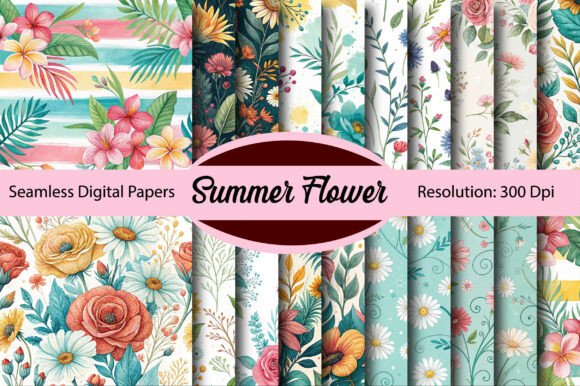
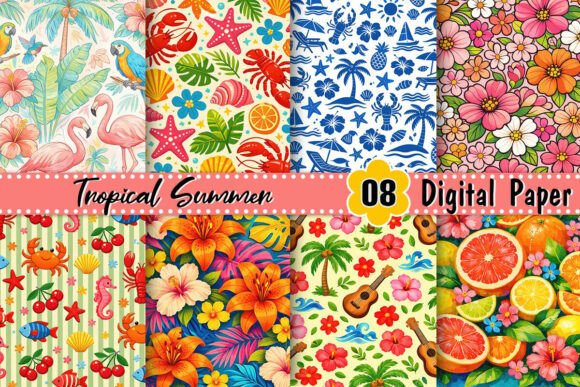
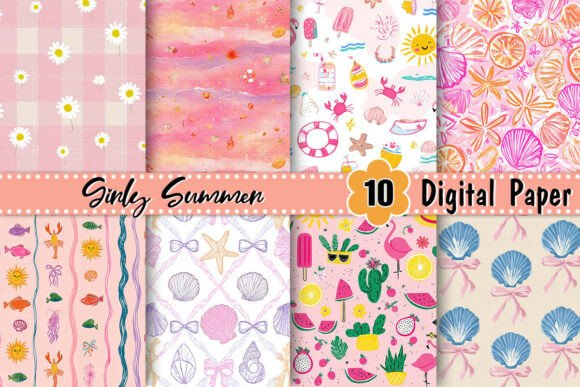
At its core, digital paper refers to image files that simulate the texture, pattern, and appearance of traditional scrapbook paper. However, instead of being physical sheets you buy at a craft store, they exist as digital files—typically in JPG or PNG formats. When we specify "Girly Summer," we are talking about a curated collection of these patterns featuring themes associated with femininity and the summer season. Think soft pastels, bright corals, floral motifs, polka dots, watercolor washes, and imagery of sunflowers, lemons, or beach elements.
A standard collection, such as the 10 JPG Digital Images set often found in marketplaces, provides a cohesive palette. These images are usually designed to work together, ensuring that when you layer them in a project, the colors harmonize rather than clash. The "non-seamless" designation is a crucial technical detail. Unlike seamless textures that tile infinitely without visible edges, non-seamless papers are designed as standalone 12x12 inch (or similar) sheets with specific compositions. This makes them ideal for backgrounds, framing, and distinct design elements where the edge of the pattern is part of the aesthetic.
The Importance of High Resolution (300 DPI)
One of the most significant factors in choosing digital paper is resolution. You will frequently see specifications like 300 DPI (Dots Per Inch). But what does this actually mean for your project? DPI measures the printing resolution. A file with 300 DPI contains enough pixel data to be printed clearly and sharply at its intended size.
If you were to use a low-resolution image (say, 72 DPI, which is standard for web browsing) and try to print it on an invitation or a planner page, the result would be pixelated, blurry, and unprofessional. By utilizing a 300 DPI Girly Summer Digital Paper pack, you ensure that your digital creations translate perfectly into the physical world. Whether you are printing stickers for an Etsy shop, creating handmade greeting cards, or producing classroom rewards, high resolution guarantees crisp lines and vibrant colors.
Practical Applications in Modern Life and Business
The utility of these digital assets extends far beyond simple hobbyist scrapbooking. In today's digital-first economy, these papers are vital tools for various sectors:
- Small Business Branding: Entrepreneurs selling handmade goods often need packaging that stands out. Using summer-themed digital papers to line gift boxes or design thank-you cards adds a professional, personalized touch that customers love.
- Educational Resources: Teachers and homeschooling parents constantly seek engaging materials. Creating summer reading logs, math worksheets, or behavior charts with cheerful, girly summer patterns can make learning feel less like a chore and more like a fun activity.
- Digital Planning: The rise of tablets and styluses has birthed the digital planning community. Users import these JPGs into apps like GoodNotes or Notability to create hyper-realistic summer journals, travel planners, and bullet journals.
- Social Media Content: Influencers and content creators use these backgrounds to frame product photos or create cohesive Instagram story highlights that match the summer vibe.
Bridging the Gap Between Digital and Physical
A common misunderstanding is that "digital" means the end product must remain on a screen. In reality, digital paper is often the bridge to physical craftsmanship. Because these files are instant downloads, they eliminate shipping costs and wait times. A crafter in New York can purchase a set, print it on their home printer within minutes, and have a finished project by the afternoon. This immediacy accelerates the creative process and allows for rapid prototyping of ideas.
Furthermore, the non-seamless nature of these specific 10-image sets allows for intentional design. Since the pattern doesn't need to repeat invisibly, artists can place specific elements—like a large watercolor flower in the corner of the sheet—knowing exactly where it will appear in the final layout. This level of control is essential for card making and collage art.
How to Get Started with Your Digital Collection
Integrating these assets into your workflow is straightforward, even for beginners. Here is a logical approach to maximizing your Girly Summer Digital Paper purchase:
- Organize Your Files: Once downloaded, create a dedicated folder on your computer. Name it clearly (e.g., "Summer 2024 Papers") so you can find it quickly during future projects.
- Choose Your Software: You do not need expensive software to use these JPGs. Free tools like Canva, Google Slides, or even Microsoft Word can handle these images effectively. For more advanced editing, Adobe Photoshop or Illustrator offers greater control over layers and masking.
- Select the Right Paper: Open your document and import the JPG that best fits your background needs. Remember, because they are 300 DPI, you can scale them down without losing quality, but avoid scaling them up significantly beyond their original dimensions.
- Layer and Customize: Add text boxes, clip art, or photos on top of the digital paper. The "girly" aesthetic often pairs well with handwritten fonts and soft shadow effects.
- Print or Export: If your goal is physical, ensure your printer settings are set to "High Quality" or "Photo" to utilize the 300 DPI resolution. If your goal is digital, export as a PDF or high-quality JPG for sharing.
Maximizing Value from a 10-Image Set
You might wonder if ten images are enough for a whole summer of projects. The answer is a resounding yes, provided you use them creatively. By mixing and matching, cropping specific sections of a pattern to use as borders, or changing the opacity of the layers, a single sheet of digital paper can yield dozens of unique design elements. Additionally, these papers often serve as the foundation for larger kits; you can combine them with your own photography or hand-drawn illustrations to create entirely new composite designs.
Conclusion: Embracing the Seasonal Shift
Incorporating Girly Summer Digital Paper into your creative toolkit is more than just following a trend; it is about harnessing the psychological power of color and seasonality. Summer evokes feelings of joy, relaxation, and growth. By infusing these emotions into your designs—whether for a business product, a classroom lesson, or a personal memory book—you connect more deeply with your audience.
The combination of high-resolution clarity (300 DPI), convenient digital delivery (10 JPG files), and thematic relevance makes these non-seamless papers an invaluable resource. They democratize design, allowing anyone with a computer and a printer to produce professional-grade materials. As you move forward into the warmer months, consider how these vibrant, floral, and sunny textures can transform your next project from ordinary to extraordinary. The possibilities are as endless as the summer days themselves.